Interoperability Capstone: MCP, A2A & Microsoft 365
Tie a Foundry agent to the open ecosystem and the surfaces your users live in: consume MCP tools, interoperate with peers over A2A, and publish the agent into Microsoft 365 — managed core, open edges.
Download starter repoOn this page▾
- Before you start: this is a billed Azure service
- About this series
- What you'll build
- Why this matters (the 5-minute business case)
- Concepts you'll use (2-minute primer)
- Prerequisites
- Step 1 — Consume MCP tools
- Step 2 — Interoperate over A2A (preview)
- Step 3 — Publish to Microsoft 365
- Step 4 — Run the full picture
- Cost & cleanup
- Verified against
- Series wrap-up
Before you start: this is a billed Azure service
- Cost and account. An Azure subscription, a Foundry project, and a deployed agent. This capstone touches several billed services at once — clean up afterward.
- Authored against the docs, not executed live. Code is written against the official docs and syntax-checked, not run during authoring. A2A is preview and the publishing surfaces evolve — pin versions and verify.
- Two languages. Python-primary with .NET noted.
About this series
This is Part 12 — the capstone — of the Microsoft Foundry series. You've built an agent (and a multi-agent system) up through grounding, tools, memory, evaluation, safety, governance, and observability, all on Microsoft's managed platform. This final lab connects it to the open ecosystem and the surfaces your users already live in: it consumes MCP, talks to peers over A2A, and publishes to Microsoft 365.
What you'll build
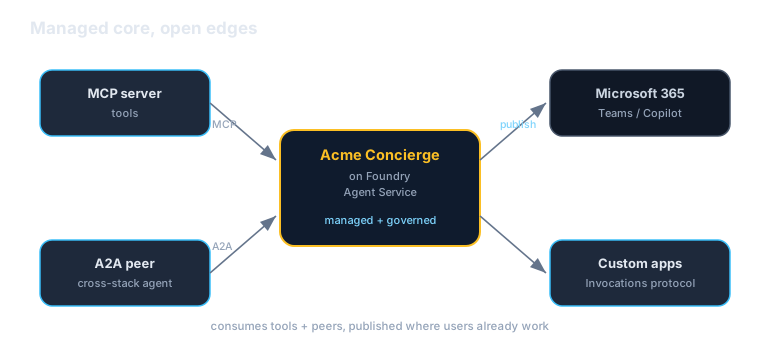
You'll make the Acme concierge a reachable, interoperable citizen:
- Consume MCP — use external tools via the Model Context Protocol (from Lab 4).
- A2A — connect to / expose over the Agent-to-Agent protocol (preview) so agents across stacks can work together.
- Publish to Microsoft 365 — surface the agent in Teams / Microsoft 365 Copilot via the Activity Protocol, and integrate with custom apps via the Invocations protocol.
Why this matters (the 5-minute business case)
Read this before handing the lab to your team.
The strategic question with any managed platform is: am I building leverage, or building a cage? Managed services are a huge productivity win — that's the whole series — but a platform you can't get out of, or that can't talk to anything outside itself, is a liability. The answer isn't to avoid managed platforms; it's to use ones that speak open protocols and reach your users where they are. This lab proves Foundry does both.
Three reasons this is a leadership-level concern:
- Managed *and* open beats choosing one. You keep the operational leverage of the Agent Service (Labs 2–10) and the optionality of open protocols — MCP for tools, A2A for agents. You're not betting the company on a walled garden.
- Reaching users where they are is the adoption multiplier. An agent nobody opens is worthless. Publishing to Microsoft 365 / Teams / Copilot puts it in the tools your organization already lives in every day — often the difference between a pilot and real usage.
- Open protocols are anti-lock-in insurance. Because the agent speaks MCP and A2A at its edges, you can swap tools, peers, or even the host without a rewrite. That optionality is worth real money the day a price, model, or strategy changes — the control-plane argument made concrete.
The honest caveats:
- Open protocols don't erase trust boundaries. Calling external tools and agents multiplies the surface. The safety and identity work from Labs 7–8 is what makes interop safe — don't skip it because the capstone is exciting.
- More moving parts, more failure modes. A2A peers and MCP tools can be slow or down; build for partial failure (timeouts, fallbacks).
- A2A is preview; publishing surfaces evolve. Pin versions and verify the exact flows before relying on them in production.
A framing for a non-technical stakeholder: "We use Microsoft's managed platform for the heavy lifting, but our agent talks to the outside world in open standards and shows up right inside Microsoft 365 — so it works with tools and agents from anywhere, reaches people where they already work, and we're never locked in."
Concepts you'll use (2-minute primer)
- MCP — connect external Model Context Protocol servers; their tools become agent tools (Lab 4).
- A2A (preview) — the Agent-to-Agent protocol for agents to discover and call each other across platforms.
- Microsoft 365 publishing — surface the agent in Teams / Microsoft 365 Copilot via the Activity Protocol.
- Invocations protocol — a flexible endpoint integration for calling the agent from custom apps and services.
- Managed core, open edges — Foundry hosts and governs the agent; the protocols at its edges keep it interoperable.
One sentence: consume MCP tools, interoperate with agents over A2A, and publish the agent into Microsoft 365 — open at the edges, managed at the core.
Prerequisites
| You need | Notes |
|---|---|
| A deployed agent | From Lab 2 (ideally the Lab 9 concierge) |
| The SDK | pip install azure-ai-projects azure-identity — pin it |
| An MCP server | A trusted remote MCP server (Lab 4) |
| M365 publishing rights | To publish to Teams / Microsoft 365 Copilot |
az login | Code uses DefaultAzureCredential |
Step 1 — Consume MCP tools
Attach a remote MCP server so the agent can use its tools (recap from Lab 4):
from azure.ai.agents.models import McpTool

mcp = McpTool(
    server_label="acme_orders_mcp",
    server_url="https://mcp.acme.example.com/orders",
    allowed_tools=["get_order", "list_orders"],  # scope what's allowed
)
# add mcp.definitions to the concierge's tools
The concierge can now use any tool the MCP server exposes — including ones built by other teams or vendors — with no bespoke integration.
Step 2 — Interoperate over A2A (preview)
The A2A protocol lets agents on different platforms discover and call each other. Foundry supports A2A (preview) so your concierge can delegate to — or be called by — agents built outside Foundry (LangGraph, CrewAI, another cloud), the same way connected agents work inside Foundry (Lab 9).
# Connect to an external A2A peer (e.g., a partner's returns service) and use it
# like a connected agent. The A2A integration is in preview — check the docs for
# the exact client/wiring for your SDK version.
This is the cross-stack version of multi-agent: your agent and a partner's agent collaborating over an open protocol, no shared platform required.
Step 3 — Publish to Microsoft 365
Put the agent where your users already are. Through the Activity Protocol, publish the Acme concierge to Microsoft 365 / Teams / Copilot so employees (or customers) interact with it in the tools they use every day. For custom apps and services, the Invocations protocol gives you a flexible endpoint to call the agent directly.
In the portal, use the agent's publish / channels flow to target Microsoft 365; then your governed, observable, multi-agent system shows up as an assistant inside Teams or Copilot — not a separate app nobody opens.
.NET note: the same agent is reachable from C# via the Agent Framework and the OpenAI-compatible surface; M365 publishing is a platform/portal capability independent of SDK language.
Step 4 — Run the full picture
End to end, a single request can now:
- Hit the concierge (hosted on the Agent Service, published into Teams).
- Use MCP tools to look up an order.
- Delegate a return to a specialist — a connected agent (Lab 9) or an external A2A peer.
- Return a grounded (Lab 3), safety-screened (Lab 7) answer — every step traced (Lab 10) and governed (Lab 8).
That's a production-shaped, multi-agent, multi-protocol system — managed where it helps, open where it matters, and reachable where your users are.
Cost & cleanup
This capstone lights up several services. Tear them all down:
- Delete the deployed agents (concierge + specialists).
- Remove any M365 publish/channel registrations from the lab.
- Stop any local MCP / A2A processes; remove test peers.
- Delete leftover resources from earlier labs (search indexes, Cosmos DB, Content Safety, fine-tuned models, Application Insights).
- Confirm in Cost Management that nothing is still accruing.
If a lab created it and you're done, delete it today.
Verified against
- Microsoft Foundry open-standards docs — MCP, A2A (preview), Activity Protocol (Microsoft 365 publishing), Invocations protocol — and the `azure-ai-projects` /
azure-ai-agentsSDK, June 2026. - A2A and publishing surfaces are evolving (A2A is preview); code/flows are written against the docs but not executed during authoring. Pin versions and verify.
Series wrap-up
That's the full Microsoft Foundry series — twelve labs from a no-code agent to a managed, open, governed, multi-agent system published into Microsoft 365:
- Platform tour · 2. Agent Service & SDK · 3. Grounding (Foundry IQ) · 4. Tools (built-in, OpenAPI, MCP) · 5. Threads & memory · 6. Evaluations · 7. Content Safety & Prompt Shields · 8. Identity & governance · 9. Connected agents · 10. Observability & cost · 11. Fine-tuning · 12. this capstone.
Where to go next:
- Building for real? Labs 1–5 get you a capable agent; 6–10 make it measurable, safe, governed, and observable; 11–12 customize and connect it.
- The strategy behind all of it lives in the articles — start with "Stop Picking a Model. Pick a Control Plane." The labs show you how; that piece argues why.
Build something, measure it honestly, govern it, keep the edges open — and put it where your users already are. That's the whole game.
Written by Wes Goldwater, Director of Engineering at Prosigliere.
Hands-on cloud & pragmatic AI from Goldwater.dev.