Platform Tour & Your First Agent
Get oriented in Microsoft Foundry and build a working agent with no code — deploy a model from the catalog, give it instructions and a built-in tool, and test it in the playground.
On this page▾
- Before you start: this is a billed Azure service
- About this series
- What you'll build
- Why this matters (the 5-minute business case)
- Concepts you'll use (2-minute primer)
- Prerequisites
- Step 1 — Create a project and get oriented
- Step 2 — Deploy a model from the catalog
- Step 3 — Create your first agent
- Step 4 — Add a built-in tool
- Step 5 — Test it in the playground
- Cost & cleanup
- Verified against
- What's next
Before you start: this is a billed Azure service
- Cost and account. This series requires an Azure subscription and a Microsoft Foundry project, with at least one model deployed from the catalog. Most tools have no free tier; this lab flags cost drivers (model/token usage while you test) and ends with a teardown note. Exploring the portal is cheap; the cleanup habit starts here.
- Authored against the docs, not executed live. This walkthrough was written against Microsoft's documentation and verified for accuracy of navigation and concepts, but not clicked through against a live subscription during authoring. Portal labels move faster than docs — treat exact button text as a guide and look for the nearest equivalent. The shape of the flow is stable.
- Console, not code. Lab 1 is a guided portal walkthrough — no starter repo, because the whole point is to build an agent with no code. The SDK labs (starting at Lab 2) ship code, Python-primary with .NET noted.
About this series
This is the first of a twelve-part series on Microsoft Foundry — Microsoft's managed platform (formerly Azure AI Foundry) for building, grounding, evaluating, governing, deploying, and operating AI agents. The series is a tool-by-tool tour: the Foundry Agent Service, the model catalog, the Foundry IQ knowledge layer, the tool ecosystem (built-in, custom, OpenAPI, MCP), threads and memory, evaluations, content safety, identity and governance, multi-agent orchestration, observability, fine-tuning, and the open-standards story.
It's standalone — you don't need any prior series to follow it. We reuse a single Acme orders-and-returns example throughout so each lab builds on the last.
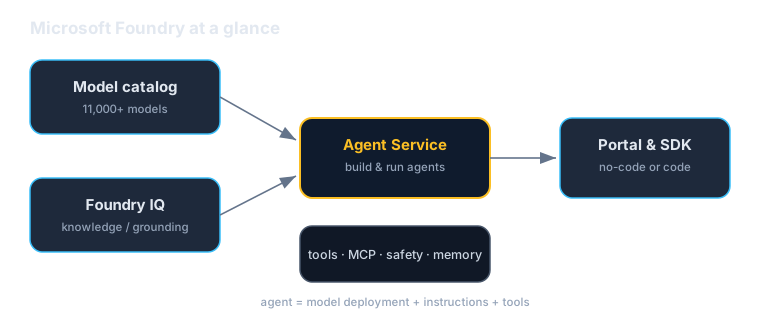
What you'll build
By the end of this lab you'll have a working Acme Orders assistant — an agent that answers customer questions about orders — built entirely in the Foundry portal, with no code. You'll deploy a model from the catalog, give the agent an instruction and a built-in tool, and test it in the playground.
It's deliberately small. The point of Lab 1 is to make the platform's mental model concrete — where each piece lives and how the no-code on-ramp works — so the SDK labs that follow have a foundation to build on.
Why this matters (the 5-minute business case)
Read this section before handing the lab to your team.
Foundry's pitch is a single, governed platform for the whole agent lifecycle, with the model as a swappable part. Instead of stitching together a model API, a vector store, a safety service, and an observability stack, you get them as integrated, managed services — and a catalog of 11,000+ models (OpenAI, Meta, DeepSeek, xAI, and more) you can switch between without re-platforming.
Three reasons this is a leadership-level concern:
- The no-code on-ramp shortens the distance from idea to prototype. A subject-matter expert can build and test a working agent in the portal — instruction, a tool, a live test — without an engineering sprint. That collapses the gap between the person who understands the workflow and a working prototype.
- It's one governed platform, not a pile of glue. Grounding, safety, identity, evaluation, and observability come from the same place with consistent controls. That's the "standardize the control plane" argument — the durable enterprise decision is the platform you build inside, not this quarter's best model.
- Multi-model is an anti-lock-in asset. Because Foundry is wire-compatible with the OpenAI API and offers a broad model catalog, the model is a configuration choice you can revisit — not a rewrite. You keep optionality while using the managed conveniences.
The honest caveats, because pragmatic adoption means naming them:
- It's a billed service with mostly no free tier. Convenience has a meter. Every lab flags cost drivers and teardown; budget for it (Lab 10 is entirely about observability and cost).
- No-code is a fast start, not the finish line. The portal is excellent for prototyping and for agents a non-engineer can own. But an agent trapped in a portal isn't version-controlled, testable, or deployable through your pipelines the way code is. Know when to graduate a prototype into the SDK.
- A managed platform is still a dependency. You adopt Microsoft's roadmap and naming (which, as the Azure AI Foundry → Microsoft Foundry rename shows, can change). A reasonable trade for the leverage — go in with eyes open.
A useful framing for a non-technical stakeholder: "This is the managed platform where we can prototype an agent in an afternoon — even without engineers — then run and govern it without standing up our own AI infrastructure. We start in the visual tool; we move to code when an agent earns it."
Concepts you'll use (2-minute primer)
- Microsoft Foundry — the umbrella platform (the former Azure AI Foundry). Everything below lives inside a Foundry project in the portal.
- Model catalog — thousands of models you can deploy (OpenAI, Meta, DeepSeek, xAI, and more). You deploy a model, then reference that deployment by name.
- Foundry Agent Service — the managed service that runs agents. An agent is a model deployment + instructions + tools.
- The playground — the portal's built-in chat surface for testing an agent before you deploy or publish it.
- Built-in tools — capabilities you can switch on (file search, code interpreter, web search) without writing code. (Lab 4 goes deep on tools.)
The mental model in one sentence: deploy a model from the catalog, give it instructions and tools in the Agent Service, and test it in the playground — all in the portal.
Prerequisites
| You need | Notes |
|---|---|
| An Azure subscription | With permission to create resources |
| A Microsoft Foundry project | Create one in the Foundry portal (covered below) |
| The right role | Owner/Contributor on the project resource is simplest for a sandbox |
| A small budget | Testing an agent makes model calls, which cost a little |
No SDK, CLI, or local setup is required for this lab — everything happens in the browser.
Step 1 — Create a project and get oriented
- Sign in to the Microsoft Foundry portal and create a project (it provisions the Azure resources Foundry needs behind it). Pick a region with broad feature availability — we standardize on `eastus2` across this series.
- Take a minute to find the areas you'll use: the Model catalog, the Agents (Agent Service) area, and the playground.
- Note where Tools, Knowledge (Foundry IQ), Evaluations, and Observability live — you'll return to each in later labs.
Tip: keep this whole series in one sandbox project and resource group. It makes cleanup a single, safe operation at the end.
Step 2 — Deploy a model from the catalog
- Open the Model catalog and browse — notice the breadth (OpenAI, Meta, DeepSeek, xAI, and more). The catalog is the anti-lock-in story: the agent's brain is a choice you can change.
- Deploy a cost-efficient chat model to your project. We standardize on a `gpt-5-mini`-class deployment for the labs; pick your current equivalent.
- Give the deployment a clear name — you'll reference this deployment name (not the raw model id) from agents and code later.
Step 3 — Create your first agent
- Go to the Agents area and create a new agent.
- Name it
acme-orders-assistantand select the model deployment from Step 2. - Give it an instruction — the single most important thing you'll author:
You are the Acme Orders assistant. You help customers check the status, total, and delivery date of their orders. Always ask for an order ID if the customer hasn't provided one. Be concise and friendly. If you don't have the information, say so plainly — never guess an order's status.
Good instructions define scope, set tone, demand a required input (the order ID), and say how to behave when the agent doesn't know. That last line is your first, free guardrail against hallucination.
Step 4 — Add a built-in tool
Give the agent a capability beyond its own text. In the agent's Tools section, enable a built-in tool — for this lab, something low-risk like file search (point it at a small Acme FAQ document) or code interpreter. This shows the agent can do something, not just talk.
We keep this lab's tooling read-only. The moment an agent can take actions, "what is it allowed to do, and on whose behalf?" becomes a real question — that's the safety and identity story in Labs 7 and 8. Don't ship action-taking agents without it.
Step 5 — Test it in the playground
- Open the playground for your agent.
- Try a few messages and watch the behavior: - "What's the status of my order?" — it should ask for an order ID (your instruction required one). - "Order AC-10231, please." — it should respond using its tool/knowledge. - "Can you give me a refund?" — it should decline or defer, since that's outside the scope you defined.
- Where the behavior isn't right, tighten the instruction and re-test. This loop — adjust the instruction, test in the playground — is most of the work of building a good agent, and it's why a no-code surface is such a fast way to iterate.
You've now built and tested a working agent without writing a line of code.
Cost & cleanup
The portal is cheap to explore, but testing makes model calls, and model calls cost money — and later labs create resources (search indexes, deployed agents, thread stores) that bill until you delete them. Build the teardown habit now:
- Delete the agent you created if you don't plan to keep it.
- If you used a throwaway resource group, deleting the whole resource group is the cleanest single-step cleanup.
- Check Cost Management afterward to confirm nothing is still accruing.
A standing rule for this series: if a lab created it and you're done with it, delete it today.
Verified against
- Microsoft Foundry portal and documentation, June 2026 (platform formerly Azure AI Foundry).
- Portal navigation and feature names evolve; this lab describes the stable flow. If a label has moved, look for the nearest equivalent rather than assuming the feature is gone.
What's next
You've got the platform's mental model and a working, no-code agent. Next:
- Lab 2 — Foundry Agent Service & the SDK: build and run the same kind of agent from code (Python-primary, with the .NET equivalent noted), and meet threads and the Responses API.
- Reading the no-code portal agent and the code-first SDK agent side by side is the fastest way to understand when to reach for each.
Written by Wes Goldwater, Director of Engineering at Prosigliere.
Hands-on cloud & pragmatic AI from Goldwater.dev.