Identity, Access & Governance
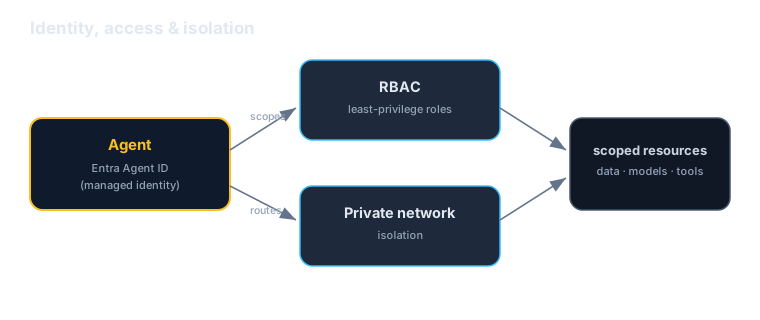
Govern who the agent is and what it may reach: a managed Microsoft Entra Agent ID, least-privilege RBAC role assignments, and network isolation — identity and access management, for agents.
Download starter repoOn this page▾
- Before you start: this is a billed Azure service
- About this series
- What you'll build
- Why this matters (the 5-minute business case)
- Concepts you'll use (2-minute primer)
- Prerequisites
- Step 1 — Give the agent a managed identity (Entra Agent ID)
- Step 2 — Scope access with RBAC (least privilege)
- Step 3 — Isolate the network
- Step 4 — Govern and review
- Cost & cleanup
- Verified against
- What's next
Before you start: this is a billed Azure service
- Cost and account. An Azure subscription, a Foundry project, and permission to manage Microsoft Entra identities, RBAC role assignments, and networking. You'll likely need elevated rights (Owner / User Access Administrator) for parts of this.
- Authored against the docs, not executed live. Config and commands are written against the official docs and checked, not run during authoring. Some capabilities are evolving — verify against the docs for your tenant.
- Hybrid: portal + config. Mostly portal, Entra, and Azure CLI / policy.
About this series
This is Part 8 of the twelve-part Microsoft Foundry series. Lab 7 screened what the agent says. This lab governs who the agent is and what it may reach: a managed Entra Agent ID, RBAC to scope access, and network isolation to contain it.
What you'll build
You'll make the Acme assistant a governed citizen of your Azure tenant:
- Identity: give the agent a Microsoft Entra Agent ID (a managed identity) instead of secrets in code.
- Access: use RBAC role assignments so the agent (and its callers) can reach only what they should — least privilege.
- Network isolation: put the project behind private networking so traffic doesn't traverse the public internet.
- Governance: apply policy and review who/what can do what.
Why this matters (the 5-minute business case)
Read this before handing the lab to your team.
Once you have more than a couple of agents, the hard questions stop being "can it answer?" and become "who is this agent, what can it touch, and can we trust it?" Those are identity, authorization, and isolation questions — the ones we solved for users and services years ago, now arriving for agents. Foundry answers them with the same Azure machinery you already use.
Three reasons this is a leadership-level concern:
- Identity is the foundation of every other control. An agent with a managed Entra identity can be named in access policies, audited, and granted scoped permissions — no long-lived secrets in code. Without identity, "what is this agent allowed to do?" has no subject, and every other guardrail rests on sand.
- RBAC is least privilege made real. Role assignments decide exactly which resources the agent and its callers can reach. That's how you contain blast radius — enforced by Azure, not hoped for in a prompt.
- Network isolation keeps data off the public path. Private networking means the agent's traffic to your data and models stays inside your network boundary — often the deciding control for regulated workloads.
The honest caveats:
- This is governance plumbing, not a user-facing feature. Its value shows up as incidents that don't happen and audits you pass. Invest accordingly — don't skip it because no demo depends on it.
- Identity enables control; it isn't control by itself. A managed identity only helps if you actually write the scoped RBAC assignments that use it. Granting broad roles and calling it done is theater.
- Some capabilities are evolving. Entra Agent ID and related governance features are maturing — verify the exact flow for your tenant.
A framing for a non-technical stakeholder: "This gives every agent a managed corporate identity, permissions scoped to exactly what it needs, and a private network path — so we know who each agent is, control what it can reach, and keep its traffic off the public internet. It's identity and access management, for agents."
Concepts you'll use (2-minute primer)
- Microsoft Entra Agent ID — a managed identity for the agent, issued and governed in Entra. The agent authenticates as itself, no secrets in code.
- RBAC (role assignments) — Azure's role-based access control; you grant the agent's identity (and callers) least-privilege roles on specific resources.
- `DefaultAzureCredential` — in code, the agent/app uses its managed identity automatically (you've used this since Lab 2).
- Network isolation — private endpoints / VNet integration so project and data traffic stays off the public internet.
One sentence: a managed Entra identity says who the agent is, RBAC scopes what it can reach, and private networking controls how its traffic flows.
Prerequisites
| You need | Notes |
|---|---|
| A Foundry project | From Lab 1 |
| Entra + RBAC permissions | To create identities and assign roles (Owner / User Access Administrator) |
| Azure CLI | az login; az role assignment for RBAC |
| Networking rights | To configure private endpoints / VNet, if you do Step 3 |
Step 1 — Give the agent a managed identity (Entra Agent ID)
In the portal (or Entra), assign the agent a managed identity — an Entra Agent ID. From then on the agent authenticates as itself against Azure resources, and your code uses DefaultAzureCredential to pick that identity up:
from azure.identity import DefaultAzureCredential
# In production this resolves to the agent's managed identity automatically —
# no API keys, no secrets in code.
credential = DefaultAzureCredential()
A real, governable identity is the subject every later control refers to. Short-lived, managed credentials also mean there's no static secret to leak.
Step 2 — Scope access with RBAC (least privilege)
Grant the agent's identity only the roles it needs, on only the resources it needs. For example, read access to a specific storage account or search index — nothing broader:
az role assignment create \
  --assignee "<agent-managed-identity-object-id>" \
  --role "Storage Blob Data Reader" \
  --scope "/subscriptions/<sub>/resourceGroups/<rg>/providers/Microsoft.Storage/storageAccounts/<acct>"
Least privilege is the whole game: even if the agent is compromised or misled, it can only touch what you granted. Pair this with the least-privilege tools from Lab 4 and the content screening from Lab 7 and you've contained the agent on three axes — what it can do, reach, and say.
Step 3 — Isolate the network
For sensitive workloads, put the project behind private networking: private endpoints for the project and its dependencies (storage, search, the model endpoint), VNet integration, and disabling public network access where appropriate. Traffic between the agent, your data, and the models then stays inside your network boundary instead of traversing the public internet.
This is configured at the project/resource level in the portal or via infrastructure-as-code — and it's often the control that gets an agent approved for regulated data.
Step 4 — Govern and review
- Audit who and what holds which roles; remove standing access nobody uses.
- Apply Azure Policy to enforce baselines (e.g., require private networking, deny public access) across projects.
- Review regularly — governance is a habit, not a one-time setup.
Cost & cleanup
- Identity and RBAC assignments don't bill, but private endpoints and networking resources do — delete them if they were only for this lab.
- Remove test role assignments and any managed identity created for the lab.
- Confirm in Cost Management that nothing is still accruing.
If a lab created it and you're done, delete it today.
Verified against
- Microsoft Entra Agent ID, Azure RBAC, and Foundry network isolation docs, June 2026.
- Some governance features are evolving and partly portal-driven; the RBAC command is illustrative. Verify the exact flow for your tenant before relying on it.
What's next
Your agent now has identity, scoped access, and a private network path. Next, multi-agent systems:
- Lab 9 — Connected agents & the Microsoft Agent Framework: compose task-specific agents that a primary agent delegates to.
- Identity + access here, plus tools (Lab 4) and safety (Lab 7), are the governance backbone every production agent needs before it scales.
Written by Wes Goldwater, Director of Engineering at Prosigliere.
Hands-on cloud & pragmatic AI from Goldwater.dev.