Grounding with Vertex AI Search & RAG Engine
Ground the agent in your own documents so its answers are accurate and cite their sources — via a Vertex AI Search data store in the console and a RAG Engine corpus in code, then read the grounding metadata for citations.
Download starter repoOn this page▾
- Before you start: this is a billed cloud service
- About this series
- What you'll build
- Why this matters (the 5-minute business case)
- Concepts you'll use (2-minute primer)
- Prerequisites
- Path A — Vertex AI Search (console-first)
- Path B — RAG Engine (SDK-first)
- Inspect the grounding metadata (citations)
- Cost & cleanup
- Verified against
- What's next
Before you start: this is a billed cloud service
- Cost and account. You need a Google Cloud project with billing enabled and the Vertex AI / Agent Builder APIs on. Grounding creates resources that bill while they exist — a Vertex AI Search data store and/or a RAG Engine corpus, plus the embedding and query calls. The cleanup step is mandatory.
- Authored against the docs, not executed live. The Python here is written against the official docs and syntax-checked, not run during authoring. The RAG and grounding APIs are evolving — pin your SDK version and adjust attribute names if your version differs.
- Hybrid: console + SDK. You'll create a data store in the console and a RAG corpus with the SDK, then attach grounding to an agent in code.
About this series
This is Part 3 of the eleven-part Gemini Enterprise Agent Platform series. Lab 1 built a no-code agent; Lab 2 deployed one to the managed runtime. Those agents could reason and call a tool — but they didn't actually know anything about Acme. This lab fixes that: you'll ground the agent in your own documents so its answers are accurate and cite their sources.
What you'll build
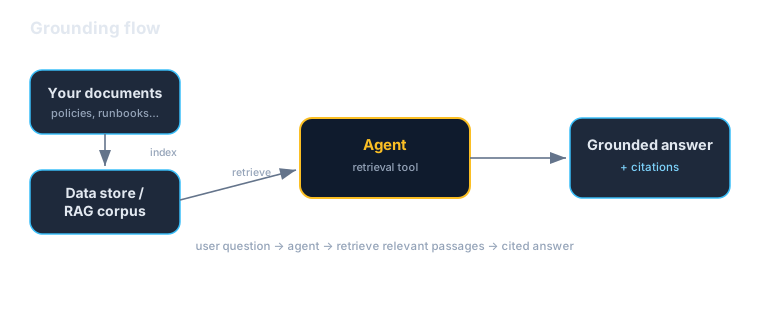
You'll give the Acme Orders assistant a knowledge base of Acme policy documents (returns, shipping, warranty) and make it answer from them — two ways:
- Vertex AI Search (console): create a data store, ingest the Acme docs, and attach it to an agent with the
VertexAiSearchTool. - RAG Engine (SDK): create a corpus, import the same docs, and attach a RAG retrieval tool in code.
Then you'll read the grounding metadata so every answer carries citations back to the source document. By the end you'll know both the managed-search path and the code-first RAG path, and when to reach for each.
Why this matters (the 5-minute business case)
Read this before handing the lab to your team.
Grounding is the single highest-leverage move for trustworthy enterprise AI. A raw model answers from its training data — confidently, and sometimes wrongly, about your business, which it has never seen. Grounding flips that: the agent retrieves the relevant passages from your documents and answers from them, with citations. It's the difference between a plausible-sounding guess and a sourced answer a customer or auditor can trust.
Three reasons this is a leadership-level concern:
- It's how you reduce hallucination on the topics that matter most. The questions your agent will actually get — "what's your return window?", "is this covered under warranty?" — are exactly the ones a generic model gets wrong. Grounding ties the answer to your real policy, so it's right and current.
- It adds provenance. Grounded answers come with citations to the source document. That's not a nicety — it's what makes the output reviewable, defensible, and safe to put in front of customers or regulators. "Here's the answer and where it came from" is a different product than "here's an answer."
- It turns documents you already have into an asset. Your policies, runbooks, and knowledge base are sitting in storage doing nothing for your agents. Grounding makes them the agent's source of truth — without retraining a model. Updating knowledge is updating a document, not a training run.
The honest caveats:
- Grounding is only as good as the retrieval. If the right passage isn't retrieved, the model can't ground on it. Chunking, the embedding model, and how clean your documents are all matter more than the LLM. When a grounded answer is wrong, suspect retrieval first (this is the lesson from the standalone Evals and RAG work — fix the pipeline before blaming the model).
- Two paths, different trade-offs. Vertex AI Search is the fastest managed on-ramp; RAG Engine gives you more control over chunking, embeddings, and retrieval. Don't run both in production for the same data — pick the one that fits.
- It bills, and the index persists. Data stores and corpora are live resources. Track them and delete what you're not using.
A framing for a non-technical stakeholder: "Grounding makes the agent answer from our own documents and show its sources, instead of guessing from general knowledge. It's how we make answers about our business accurate, current, and checkable."
Concepts you'll use (2-minute primer)
- Data store (Vertex AI Search) — a managed, indexed collection of your documents. You point it at files (in Cloud Storage) and it handles parsing, chunking, embedding, and search.
- `VertexAiSearchTool` — the ADK tool that lets an agent query a data store. The model decides when to search; the tool returns ranked passages.
- RAG Engine — a managed orchestration service for retrieval. You create a corpus, import files (it chunks and embeds them into a managed vector store), and attach a retrieval tool.
- Embedding model — turns text into vectors for similarity search (e.g.
text-embedding-005). It's the lens retrieval sees through. - Grounding metadata — returned alongside the answer:
groundingChunks(the source documents used — titles and URIs) andgroundingSupports(which sentences map to which chunks). This is your citation data.
One sentence: index your docs (data store or RAG corpus), give the agent a retrieval tool, and read the grounding metadata to turn retrieved passages into cited answers.
Prerequisites
| You need | Notes |
|---|---|
| A Google Cloud project | Billing enabled; Vertex AI / Agent Builder APIs on |
gcloud + auth | gcloud auth application-default login |
| A Cloud Storage bucket | To hold the sample Acme docs you'll ingest |
| The SDK | pip install "google-cloud-aiplatform[agent_engines,adk]" — pin the version |
| Sample docs | A few Acme policy files (provided in the starter repo) |
| Helpful | Lab 2 (the agent you're grounding); the Open Knowledge Format lab on representing knowledge |
Upload the sample docs to your bucket first:
gsutil cp sample_docs/*.md gs://your-bucket/acme-kb/Path A — Vertex AI Search (console-first)
The fastest way to grounded answers.
- In the console, open Vertex AI Search (under the Gemini Enterprise Agent Platform / Agent Builder) and create a data store.
- Choose Cloud Storage as the source and point it at
gs://your-bucket/acme-kb/. Pick unstructured documents. - Let it ingest and index (this takes a few minutes — it parses, chunks, and embeds each document).
- Note the data store ID once it's ready.
Attach it to an agent with the VertexAiSearchTool:
from google.adk.agents import Agent
from google.adk.tools import VertexAiSearchTool

DATA_STORE = (
    "projects/PROJECT_NUMBER/locations/LOCATION/collections/"
    "default_collection/dataStores/YOUR_DATA_STORE_ID"
)

search_tool = VertexAiSearchTool(data_store_id=DATA_STORE)

root_agent = Agent(
    name="acme_orders_assistant",
    model="gemini-3.5-flash",
    instruction=(
        "You are the Acme Orders assistant. Answer questions about Acme's "
        "policies using the search tool to ground your answers in the company's "
        "documents. If the documents don't cover it, say so — don't guess."
    ),
    tools=[search_tool],
)
Ask it "What's Acme's return window for opened electronics?" and it will search the data store, retrieve the relevant policy passage, and answer from it.
Path B — RAG Engine (SDK-first)
More control over chunking, embeddings, and retrieval. Create a corpus and import the same docs:
# rag_setup.py
import vertexai
from vertexai import rag

vertexai.init(project="your-project-id", location="us-central1")

corpus = rag.create_corpus(
    display_name="acme-knowledge-base",
    description="Acme policies: returns, shipping, warranty.",
    backend_config=rag.RagVectorDbConfig(
        rag_embedding_model_config=rag.RagEmbeddingModelConfig(
            vertex_prediction_endpoint=rag.VertexPredictionEndpoint(
                publisher_model="publishers/google/models/text-embedding-005"
            )
        )
    ),
)

rag.import_files(
    corpus_name=corpus.name,
    paths=["gs://your-bucket/acme-kb/"],
    transformation_config=rag.TransformationConfig(
        chunking_config=rag.ChunkingConfig(chunk_size=512, chunk_overlap=100)
    ),
)

print("Corpus:", corpus.name)
Then give an agent a RAG retrieval tool pointed at the corpus:
# agent.py
from google.adk.agents import Agent
from google.adk.tools.retrieval import VertexAiRagRetrieval
from vertexai import rag

CORPUS_NAME = "projects/.../locations/us-central1/ragCorpora/RAG_CORPUS_ID"

acme_kb = VertexAiRagRetrieval(
    name="acme_kb",
    description="Search Acme's policy documents (returns, shipping, warranty).",
    rag_resources=[rag.RagResource(rag_corpus=CORPUS_NAME)],
    similarity_top_k=5,
    vector_distance_threshold=0.5,
)

root_agent = Agent(
    name="acme_orders_assistant",
    model="gemini-3.5-flash",
    instruction=(
        "You are the Acme Orders assistant. Use the acme_kb tool to ground "
        "answers about Acme policies in the company's documents. If the "
        "documents don't cover it, say so — never guess."
    ),
    tools=[acme_kb],
)
similarity_top_k and vector_distance_threshold are your two main retrieval dials: how many chunks to pull, and how close they must be. Tune these when answers miss relevant content or pull in noise.
Inspect the grounding metadata (citations)
Grounded answers carry the data you need to cite sources. The response's grounding metadata contains the source documents and the sentence-to-source mapping. In ADK, capture it with an after_model_callback:
def attach_citations(callback_context, llm_response):
    """Log the sources behind a grounded answer."""
    meta = getattr(llm_response, "grounding_metadata", None)
    if meta and getattr(meta, "grounding_chunks", None):
        sources = []
        for chunk in meta.grounding_chunks:
            ctx = getattr(chunk, "retrieved_context", None)
            if ctx:
                sources.append(ctx.title or ctx.uri)
        if sources:
            print("Sources:", ", ".join(dict.fromkeys(sources)))
    return None  # don't modify the response

# Attach it to the agent:
root_agent.after_model_callback = attach_citationsgrounding_chunks— the actual source documents used (title, URI).grounding_supports— maps specific sentences in the answer to those chunks, which is what lets you render inline citations.
Attribute names differ slightly across SDK versions (and between the Search and RAG paths). The shape above is current as of authoring; if it doesn't match, print the raw metadata object and adjust. The concept — chunks (sources) plus supports (sentence→source mapping) — is stable.
Now when the agent answers "Can I return opened headphones after 20 days?", you get the answer and the policy document it came from — a sourced response, not a guess.
Cost & cleanup
Data stores and RAG corpora bill while they exist, and ingestion/embedding has a one-time cost. When you're done:
# Delete a RAG corpus (SDK)
from vertexai import rag
rag.delete_corpus(name="projects/.../ragCorpora/RAG_CORPUS_ID")- Delete the Vertex AI Search data store from the console if you created one.
- Delete the RAG corpus with the snippet above.
- Remove the sample docs from your Cloud Storage bucket if it was only for this lab.
- Confirm in Billing → Reports that nothing is still accruing.
The series rule holds: if a lab created it and you're done, delete it today.
Verified against
- Vertex AI Search (data stores,
VertexAiSearchTool) and RAG Engine (rag.create_corpus,rag.import_files,VertexAiRagRetrieval) docs, and the `google-cloud-aiplatform[agent_engines,adk]` SDK, June 2026. - Grounding-metadata attribute names vary by SDK version and grounding path; code is syntax-checked against the docs but not executed during authoring. Pin your version.
What's next
Your agent now answers from your documents, with citations. Next:
- Lab 4 — Tools & connectors: beyond reading documents, connect the agent to live systems — APIs, databases, and MCP servers — for real actions and fresh data.
- Cross-links: the Open Knowledge Format lab on how to represent the knowledge you just grounded on, and the Interactions API lab for grounding in a different surface. When grounding underperforms, the Evaluating Agents lab is how you measure and fix it.
Written by Wes Goldwater, Director of Engineering at Prosigliere.
Hands-on cloud & pragmatic AI from Goldwater.dev.