Platform Tour & Your First Agent in Agent Studio
Get oriented in Google's Gemini Enterprise Agent Platform and build a working agent with no code — instructions, a sample tool, and a live test — in Agent Studio, then clone a ready-made agent from Agent Garden.
On this page▾
- Before you start: this is a billed cloud service
- About this series
- What you'll build
- Why this matters (the 5-minute business case)
- Concepts you'll use (2-minute primer)
- Prerequisites
- Step 1 — Open the platform and get oriented
- Step 2 — Browse Agent Garden for a head start
- Step 3 — Create your first agent in Agent Studio
- Step 4 — Give it instructions and a sample tool
- Step 5 — Test it in the playground
- Step 6 — (Optional) Clone an Agent Garden sample
- Cost & cleanup
- Verified against
- What's next
Before you start: this is a billed cloud service
Unlike the ADK and open-protocol labs in this library — which were pip-installable and runnable offline — this series teaches a managed Google Cloud platform. That changes three things, and every lab in the series states them up front:
- Cost and account. You need a Google Cloud project with billing enabled and the relevant APIs turned on. Most of these tools have no free tier; this lab flags the cost drivers (model calls while you test) and ends with a teardown checklist. Agent Studio itself is inexpensive to explore, but the habit of cleaning up starts here.
- Authored against the docs, not executed live. This walkthrough was written against Google's documentation and verified for accuracy of navigation and concepts, but not clicked through against a billed project during authoring. Console labels move faster than docs, so treat exact button text as a guide and look for the nearest equivalent — the shape of the flow is stable even when names shift.
- Console, not code. Lab 1 is a guided console walkthrough. There's no starter repo because there's nothing to ship yet — the whole point is to build an agent with no code. The SDK-first labs (starting at Lab 2) come with code.
About this series
This is the first of an eleven-part series on the Gemini Enterprise Agent Platform — the managed Google Cloud platform for building, grounding, evaluating, governing, deploying, and operating AI agents. (On April 22, 2026, Google folded Vertex AI into this platform; all the former Vertex AI agent services now live here.)
Where the ADK series taught the open-source framework for building agents in code, this series teaches the managed platform — the pieces Google Cloud runs for you instead of code you write and operate yourself. The two are complementary, and we cross-link rather than repeat: when a platform tool is "the managed version" of something you built by hand in ADK, the lab says so.
The full arc: a platform tour and Agent Studio (this lab), the managed Agent Engine runtime, grounding with Vertex AI Search, tools and connectors, sessions and memory, an example store, the Gen AI evaluation service, Model Armor and safety, agent identity and the registry, observability and cost, and an interoperability capstone. We reuse the Acme orders-and-returns domain throughout so examples carry across every lab.
What you'll build
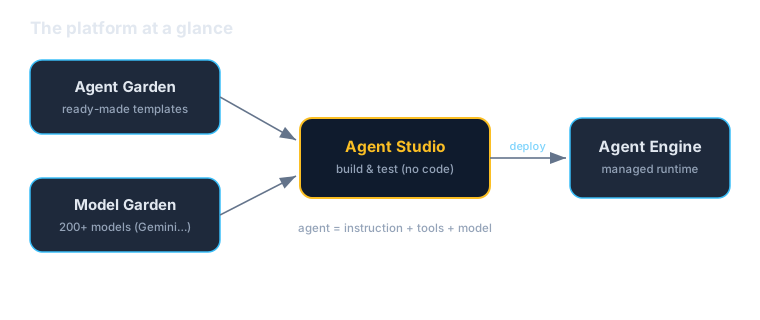
By the end of this lab you'll have a working Acme Orders assistant — an agent that answers customer questions about orders — built entirely in the Agent Studio visual canvas, with no code. You'll give it an instruction, attach a sample tool, and test it live in the playground. Along the way you'll browse Agent Garden for ready-made templates and clone one as a head start.
It's deliberately small. The point of Lab 1 is to make the platform's mental model concrete — where each tool lives and how the no-code on-ramp works — so the SDK-first labs that follow have a foundation to build on.
Why this matters (the 5-minute business case)
Read this section before handing the lab to your team.
The managed platform answers a different question than the framework. ADK answers "how do my engineers build an agent as real, version-controlled software?" The Gemini Enterprise Agent Platform answers "how does my organization build, run, and govern agents without operating the infrastructure underneath them?" Those are different jobs, and most companies need both.
Three reasons this is a leadership-level concern, not just a developer preference:
- It's a no-code on-ramp for the people closest to the problem. Agent Studio is a visual canvas: a subject-matter expert in support or operations can prototype a working agent — instructions, tools, a live test — without waiting on an engineering sprint. That collapses the distance between "someone who understands the workflow" and "a working prototype," which is exactly where most internal AI ideas stall.
- It's one governed platform, not a pile of glue. Building agents yourself means assembling grounding, memory, evaluation, safety, identity, and observability from separate parts. The platform offers those as managed, integrated services with consistent controls — the same "standardize the control plane" argument that makes enterprise AI legible and auditable instead of a sprawl of one-off projects.
- Managed doesn't have to mean locked in. The platform runs ADK agents, connects over open protocols (MCP, A2A), and offers 200+ models through Model Garden. You can use the managed conveniences while keeping an exit — a theme the final lab in this series makes concrete.
The honest caveats, because pragmatic adoption means naming them:
- It's a billed service with mostly no free tier. Convenience has a meter. Every lab here flags cost drivers and teardown; budget for it and watch your spend (Lab 10 is entirely about observability and cost).
- No-code is a fast start, not the finish line. Agent Studio is excellent for prototyping and for agents a non-engineer can own. But an agent trapped in a console isn't version-controlled, testable, or deployable through your pipelines the way an ADK agent is. Know when to graduate a prototype into code.
- A managed platform is still a dependency. You're adopting Google's roadmap and naming (which, as the Vertex AI rename shows, can change). That's a reasonable trade for the leverage — just go in with eyes open.
A useful framing for a non-technical stakeholder: "This is the managed platform where we can prototype an agent in an afternoon — even without engineers — and then run and govern it without standing up our own infrastructure. We start in the visual tool; we move to code when an agent earns it."
Concepts you'll use (2-minute primer)
A quick map of the pieces you'll touch, so the navigation makes sense:
- Gemini Enterprise Agent Platform — the umbrella product (the former Vertex AI). Everything below lives inside it, in the Google Cloud console.
- Agent Studio — the low-code visual canvas for designing, prototyping, testing, and managing agents and their reasoning loops. This is where you'll build today.
- Agent Garden — a curated library of agent templates (invoice processing, research, code modernization, and more) you can clone as a starting point instead of building from scratch.
- Model Garden — first-class access to 200+ models (Google's Gemini line plus open and third-party models). Your agent picks its model from here.
- The playground — the built-in chat surface for testing an agent interactively before you deploy it anywhere.
- Agent Engine — the managed runtime where agents are deployed to run in production. You won't deploy today; that's Lab 2. For now, just know it's the target.
The mental model in one sentence: Agent Studio is where you design and test an agent, Agent Garden gives you a head start, Model Garden supplies the brain, and Agent Engine (later) is where it runs for real.
Prerequisites
| You need | Notes |
|---|---|
| A Google Cloud project | With billing enabled |
| Console access | The right IAM role to use the Agent Platform (Owner/Editor in a sandbox project is simplest) |
| A few dollars of budget | Testing an agent makes model calls, which cost a little |
| Helpful: ADK Lab 1 | This lab is the no-code mirror of the agent you built in code there |
No SDK, CLI, or local setup is required for this lab — everything happens in the browser.
Step 1 — Open the platform and get oriented
- Sign in to the Google Cloud console and select (or create) a sandbox project with billing enabled.
- From the navigation menu, open the Gemini Enterprise Agent Platform section (you may still see "Vertex AI" in some menus and URLs during the transition — it's the same place).
- If prompted, enable the required APIs for the Agent Platform. The console will usually offer a one-click "Enable" for the APIs a feature needs the first time you open it.
- Take a minute to find the three places you'll use: Agent Studio, Agent Garden, and Model Garden. Orienting now saves hunting later.
Tip: keep this whole lab inside one throwaway project. It makes the cleanup at the end a single, safe operation.
Step 2 — Browse Agent Garden for a head start
Before building anything, see what already exists.
- Open Agent Garden.
- Skim the template catalog — you'll see ready-made agents for things like invoice processing, research, and code modernization, alongside reusable tools and samples.
- Pick one whose description is closest to a real workflow on your team and read how it's structured: its instructions, the tools it uses, and the model it runs on.
The point isn't to use a template yet — it's to learn the anatomy of an agent on this platform by reading good examples. Notice that every agent is some combination of instructions + tools + a model, the same shape you'll build by hand in the next steps (and the same shape ADK uses in code).
Step 3 — Create your first agent in Agent Studio
- Open Agent Studio and start a new agent.
- Give it a clear name —
acme-orders-assistant— and a one-line description: "Answers Acme customer questions about their orders." - Choose a model from Model Garden when prompted. A current Gemini model (for example, a Gemini 3.1 Flash-class model) is a sensible, cost-efficient default for a simple assistant; you can change it later.
You now have an empty agent. The next two steps give it a job and a capability.
Step 4 — Give it instructions and a sample tool
Write the instruction. The instruction is the agent's job description — the single most important thing you'll author. Paste something like:
You are the Acme Orders assistant. You help customers check the status, total, and delivery date of their orders. Always ask for an order ID if the customer hasn't provided one. Be concise and friendly. If you don't have the information, say so plainly — never guess an order's status.
Notice what good instructions do: they define scope, set tone, demand a required input (the order ID), and — importantly — tell the agent how to behave when it doesn't know. That last line is your first, free guardrail against hallucination.
Add a sample tool. A tool is a capability the agent can choose to use. Add one of the built-in or sample tools available in Agent Studio (for example, a simple function or a sample data lookup) so the agent has something to call beyond its own text. Give the tool a clear name and description — on this platform, as in ADK, the description is the interface: it's what the model reads to decide when to use the tool. For this lab a sample/placeholder order-lookup tool is enough; Lab 4 covers wiring real APIs, databases, and MCP servers.
We keep this lab's tool read-only on purpose. The moment an agent can take actions, "what is it allowed to do, and on whose behalf?" becomes a real question — that's the identity and safety story in Labs 8 and 9. Don't ship action-taking agents without it.
Step 5 — Test it in the playground
- Open the playground (the test/preview panel in Agent Studio).
- Try a few messages and watch how the agent behaves: - "What's the status of my order?" — it should ask for an order ID (your instruction required one). - "Order AC-10231, please." — it should attempt to use your lookup tool and answer from the result. - "Can you give me a refund?" — it should decline or defer, because that's outside the scope you defined.
- Where the behavior isn't right, go back to the instruction and tighten it, then re-test. This loop — adjust the instruction, test in the playground — is most of the work of building a good agent, and it's why a no-code canvas is such a fast way to iterate.
You've now built and tested a working agent without writing a line of code.
Step 6 — (Optional) Clone an Agent Garden sample
To feel the head-start that templates give you:
- Return to Agent Garden and open the sample you liked in Step 2.
- Clone it into your project as a new agent.
- Open the clone in Agent Studio and explore how it's wired — then change one thing (an instruction line, a tool, the model) and re-test in the playground.
Cloning and tweaking a template is, in practice, how most teams start: begin from something that works, then shape it to your domain.
Cost & cleanup
Agent Studio is cheap to explore, but testing makes model calls, and model calls cost money — and later labs create resources (search indexes, deployed runtimes) that bill until you delete them. Build the teardown habit now:
- Delete the agents you created in Agent Studio if you don't plan to keep them.
- If you created this work in a throwaway project, the cleanest cleanup is to delete or shut down the whole project, which removes everything at once.
- Check Billing → Reports afterward to confirm there's nothing still accruing.
A standing rule for this whole series: if a lab created it and you're done with it, delete it today.
Verified against
- Gemini Enterprise Agent Platform documentation and product pages, June 2026 (platform formed from Vertex AI on April 22, 2026).
- Console navigation and feature names evolve; this lab describes the stable flow. If a label has moved, look for the nearest equivalent rather than assuming the feature is gone.
What's next
You've got the platform's mental model and a working, no-code agent. Two natural next steps:
- Lab 2 — Agent Engine: take an agent and deploy it to the managed runtime, then call it from the SDK. This is where the prototype becomes something that runs in production.
- Compare with ADK Lab 1: you just built the Acme Orders assistant with no code. In ADK Lab 1 you build the same assistant as version-controlled Python. Reading them side by side is the fastest way to understand the trade-off between the visual platform and the code-first framework — and when to reach for each.
Written by Wes Goldwater, Director of Engineering at Prosigliere.
Hands-on cloud & pragmatic AI from Goldwater.dev.